
Description
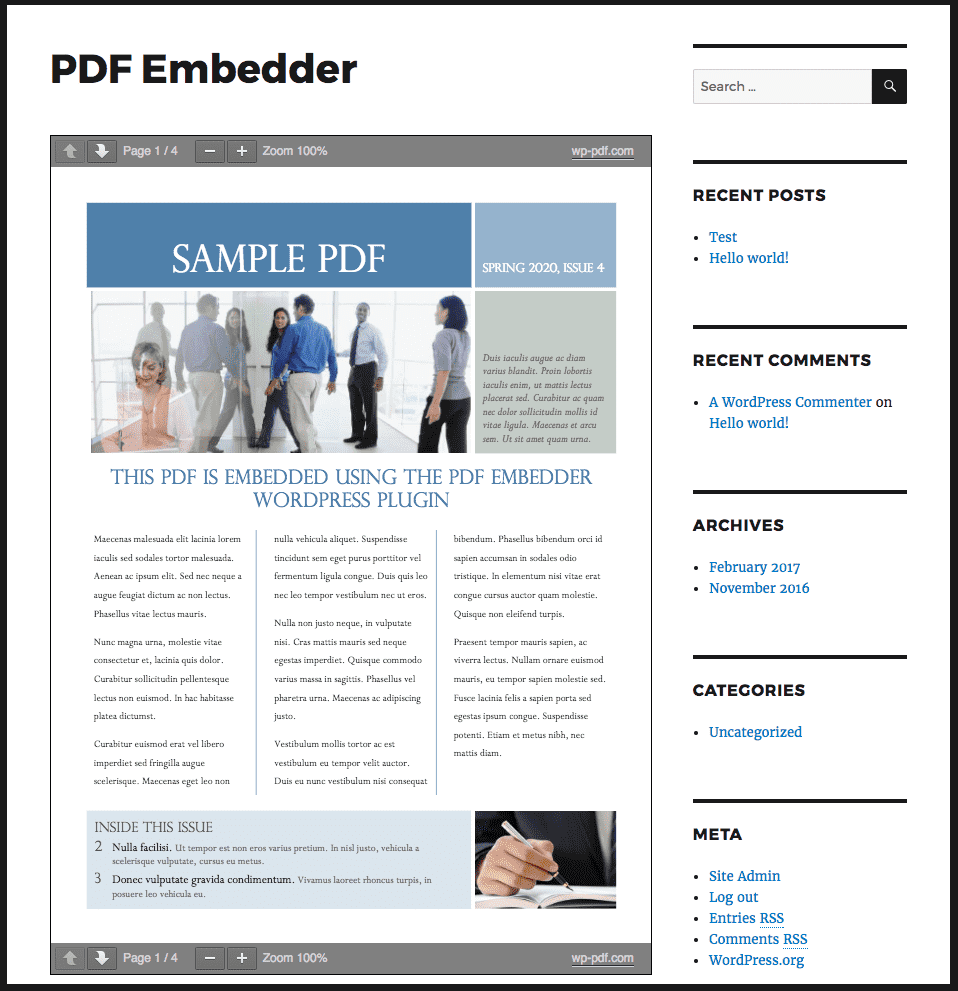
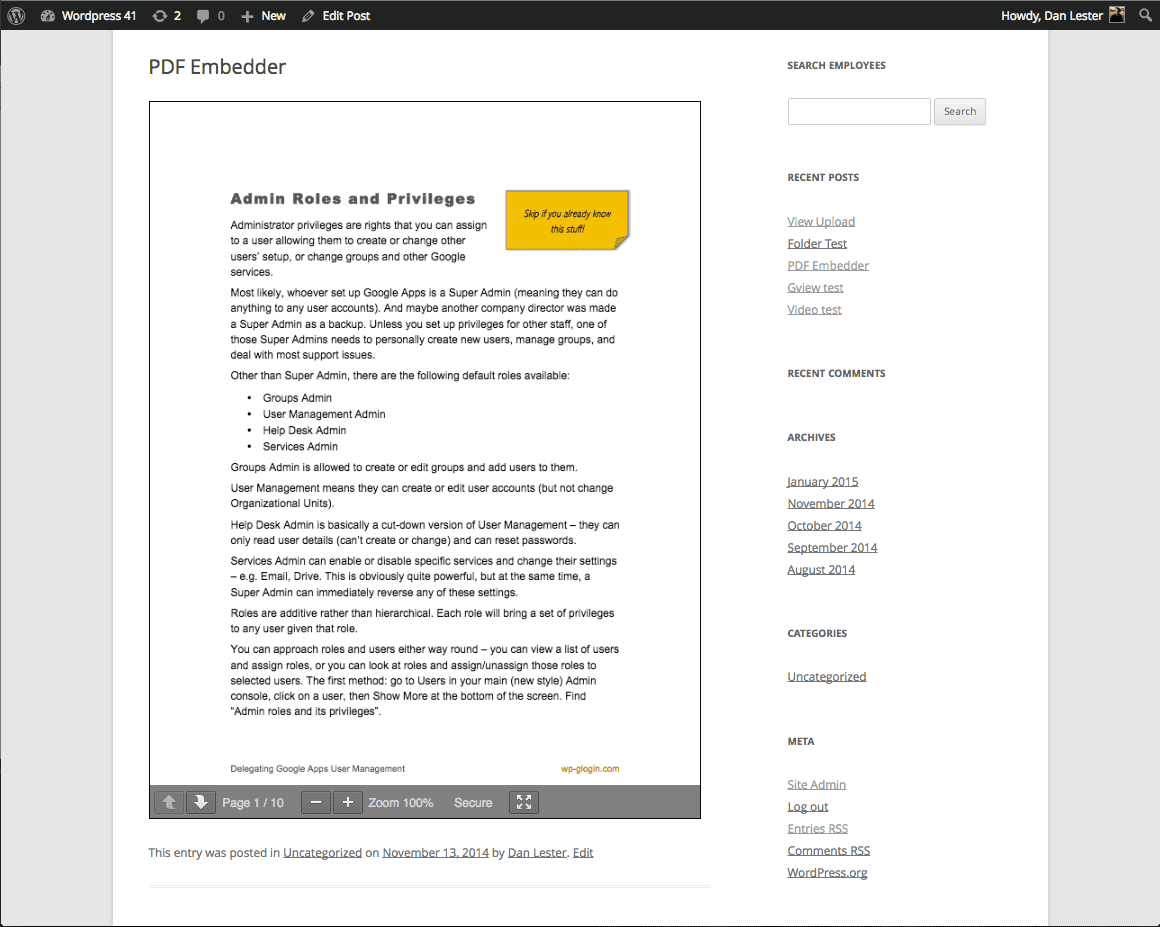
Upload PDF files and embed them directly into your site’s posts and pages, as simply as adding images. Each document displays right where you place it, at its natural size or a width you choose, and the responsive viewer adapts automatically whenever the browser dimensions change.
Out of the box, WordPress turns an uploaded PDF into a bare download link: visitors click it and leave your page, or the file opens in a viewer you don’t control. PDF Embedder keeps them reading on the page and keeps you in control of how your document looks.
PDF Embedder displays PDF documents on more than 300,000 websites. It differs from other PDF plugins in how the document becomes part of the page: rendered inline, sized to your layout, served entirely from your own site, and previewed live while you edit. There is no Google Docs Viewer or other third-party service involved, and the viewer loads its files only on pages that contain a PDF, so the rest of your site stays fast.
In the Block Editor, the PDF Embedder block shows a live preview of your document while you edit. Pick a PDF file from the block sidebar, change a setting, and the preview updates to match what visitors will see on the front end.
What can you embed?
Any PDF file, whether it lives in your Media Library or in another folder on your site. Embed unlimited PDFs across posts, pages, and custom post types. Site owners use PDF Embedder to display:
- Restaurant menus and price lists
- Ebooks, guides, whitepapers, and research reports
- Product catalogs, brochures, and lookbooks
- Newsletters, magazines, and annual reports
- User manuals and technical documentation
- Worksheets, lesson plans, and other course materials
- Sheet music, church bulletins, and event programs
- Real estate flyers, floor plans, and legal documents
- Resumes and portfolios
Visitors read the document right on the page: no new tab, no forced download, and no Adobe Acrobat or third-party account required.
How it works
- Upload a PDF to your Media Library, or copy the URL of a PDF hosted anywhere else.
- Add the PDF Embedder block and pick the file from the block sidebar. In the Classic Editor or a page builder, use the shortcode instead.
- Publish. Visitors turn pages with the Next and Previous buttons and zoom in when part of a page is too small for their screen.
The shortcode works anywhere shortcodes do:
[pdf-embedder url="https://example.com/wp-content/uploads/2024/01/Plan-Summary.pdf"]
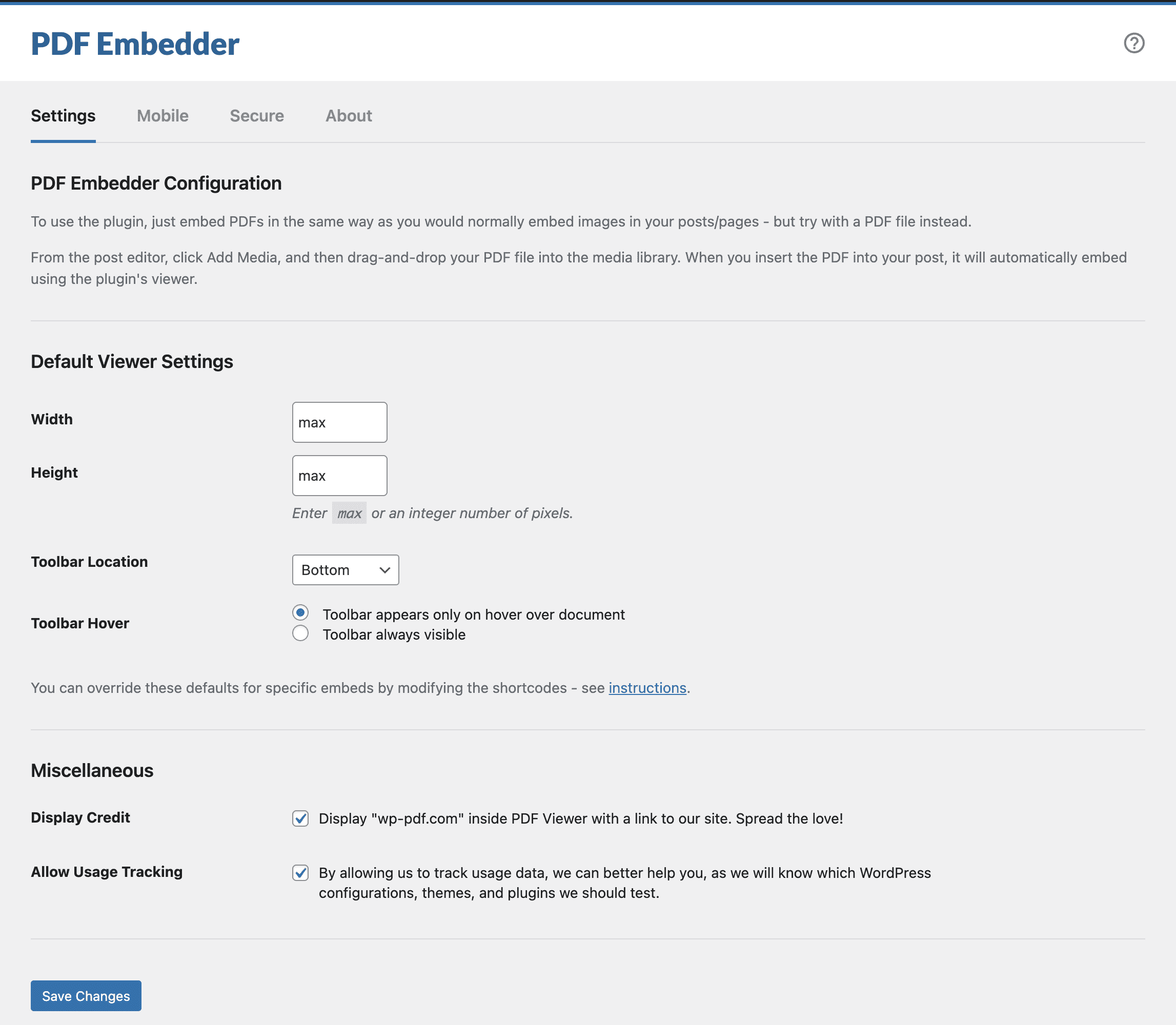
Site-wide defaults, such as width and toolbar position, live under Settings -> PDF Embedder, and any single embed can override them with its own block settings or shortcode attributes. See the Plugin Instructions for sizing options and other ways to customize.
Works with membership, e-commerce, and course plugins
PDF Embedder renders through a regular shortcode and block, so the viewer works anywhere your post content does, including pages that other plugins restrict or sell access to.
- Sell access to premium PDF content, such as ebooks, reports, or research papers, by embedding it on pages protected with MemberPress, Paid Memberships Pro, Restrict Content Pro, or WooCommerce Memberships.
- Deliver handouts and workbooks inside courses built with LearnDash, LifterLMS, or Tutor LMS.
- Show a free sample chapter on a WooCommerce or Easy Digital Downloads product page, and deliver the full ebook after purchase.
- Embed several PDFs on one page to build a simple PDF document library for your team, school, or members.
On the Pro plan of PDF Embedder Premium, you can pair restricted pages with the secure viewer and watermarks, so members read documents online while the original file stays hard to download.
What users say
Site owners tend to stay with PDF Embedder for years. Here is what they say:
“One client wanted to display PDF newsletters in a way that was clean, user-friendly, and easy to scroll through. That’s when I discovered WP PDF Embedder. It does the job beautifully, making PDFs look professional and effortless to navigate. Since then, it has become my go-to recommendation for any client who needs to showcase PDF content on their website.” — Vera Schafer
“I have been using PDF Embedder for well over ten years. It’s just a great app. Can’t recommend it enough.” — Rich Calo
“I have been using this plugin (both the free version and the pro version) for a number of years on various clients’ websites. It is easy to set up, does what it needs to and just works the way a plugin should. I highly recommend it.” — DebsWebs
“I’ve been using PDF Embedder Secure for 3 years now, and it helped me sharing my paid content securely, preventing malicious people from buying my PDF files and then sharing them illegally everywhere. PDF files are chopped, digested, watermarked, unaccessible even if someone finds the direct link.” — Daniele Benedettelli
Go further with PDF Embedder Premium
In the free plugin, there is no download button and links inside the PDF are not clickable – the viewer is intentionally simple to fulfill the “read online” goal. PDF Embedder Premium adds those and more:
- Download button in the toolbar, so visitors can save your document for later.
- Working hyperlinks, both within the document and out to any other page.
- Continuous scroll – readers scroll through pages naturally instead of clicking through them.
- Mobile-friendly full screen mode – when the document renders narrower than a width you set, as it does on most phones, it displays as a thumbnail with a large “View in Full Screen” button. The document opens with the full focus of the mobile browser, and readers swipe between pages instead of clicking buttons.
- Jump to page – type a page number in the toolbar to go straight there.
- Full-text search – visitors search the text of your PDF documents from the toolbar and jump straight to matching pages.
- View and download tracking – see which documents people actually read.
- Elementor widget with the same options as the block and a live PDF preview in the Elementor editor.
- Secure viewing (Pro plan) – the PDF is encrypted during transmission, so it is difficult for a casual user to save or print the original file, and your document is far less likely to end up outside your site.
- Watermarks (Pro plan) – overlay any text, including the logged-in user’s name or email address, to discourage sharing of screenshots.
- Automatic PDF thumbnails (Elite plan) – every PDF in your Media Library gets an image thumbnail to use as a featured image, a clickable download link, or the file’s icon in the Media Library.
Every plan comes with a 14-day money-back guarantee: if Premium is not a fit, you get a refund, no questions asked.
Compare Premium plans on wp-pdf.com
Better than Google Drive embeds, Scribd, Issuu, and other PDF tools
The usual ways to embed a PDF without a plugin – an iframe snippet, the Google Drive or Google Docs viewer, or a service like Scribd, Issuu, FlippingBook, FlipHTML5, or DocDroid – hand your document to servers you don’t control. It loads at their speed, carries their branding, and can disappear or change terms at any time.
You may have also tried other WordPress PDF plugins, such as EmbedPress, Embed Any Document, PDF Poster, Wonder PDF Embed, PDF.js Viewer, or flipbook plugins like DearFlip and 3D FlipBook. Most rely on iframes or third-party viewers to display the document.
PDF Embedder keeps everything on your own site: your files, your server, your data. That is better for page speed, better for privacy, and more reliable for your visitors.
With thanks to the Mozilla team for developing the underlying pdf.js technology used by this PDF viewer plugin.
Branding guidelines
PDF Embedder is a product of wp-pdf.com. When writing about this WordPress PDF plugin, please use the correct branding:
- PDF Embedder (correct)
- PDFEmbedder (incorrect)
- PDF Embeder (incorrect)
- PDF Imbedder (incorrect)
Screenshots
Blocks
This plugin provides 1 block.
- PDF Embedder Embed PDF files straight into your content.
Installation
Easiest way:
- Go to the “Plugins > Add New” page in your WordPress dashboard
- Search for ‘PDF Embedder’
- Click Install
- Click Activate
If you cannot install from the WordPress plugins directory for any reason, and need to install from ZIP file:
- Upload directory and contents to the
/wp-content/plugins/directory, or upload the ZIP file directly in the Plugins section of your WordPress admin - Click Activate on the “Plugins” screen.
FAQ
-
How do I embed a PDF file in a WordPress post or page?
-
PDF Embedder is a WordPress PDF viewer plugin: upload your PDF file to the Media Library, add the PDF Embedder block where you want the document, and pick the file from the block sidebar. In the Classic Editor or any page builder, use the
[pdf-embedder url=""]shortcode instead. The document then displays right on the page for your visitors. -
Can I embed a PDF file that is hosted on another website?
-
Yes. Pass any direct PDF URL to the shortcode’s
urlattribute or pick it in the block – the file does not have to be in your Media Library. It needs to be a direct link to the.pdffile itself (for example, a direct Dropbox link), not a sharing or preview page, and the remote host must allow other sites to fetch the file. -
How can I obtain support for this product?
-
We have instructions and a Knowledge Base on our website explaining common setup queries and issues.
We review the ‘Support’ forum here on the wordpress.org plugin page daily and respond to questions there.
-
How can I change the size or customize the toolbar?
-
See Settings -> PDF Embedder in your WordPress admin to change site-wide defaults. You can also override individual embeds by modifying the shortcode attributes or using block options (if you use the Block Editor).
Resizing works as follows:
- If
width='max'the width will take as much space as possible within its parent container (e.g. column within your page). - If width is a number (e.g.
width="500") then it will display at that number of pixels wide.
Both height and width expect either a number (integer) or the word
max; anything else has no effect.In all cases, if the parent container is narrower than the width calculated above, then the document width will be reduced to the size of the container.
The plugin then calculates the height so the document fits naturally at that width.
The Next/Prev toolbar can appear at the top or bottom of the document (or both or none), and it can either appear only when the user hovers over the document or it can be fixed at all times.
See the Plugin Instructions for more details about sizing and toolbar options.
- If
-
Will PDF Embedder slow down my site?
-
No. The viewer is fully self-hosted: everything is served from your own server, with no calls to the Google Docs Viewer or any other third-party service, and the viewer’s files are loaded only on pages that actually contain an embedded PDF. Pages without a PDF are not affected at all.
-
Does PDF Embedder work with the Block Editor (Gutenberg)?
-
Yes. The plugin includes a PDF viewer block, the easiest way to embed PDF files in the Block Editor. Add the PDF Embedder block to a post or page, choose a PDF file from the block sidebar, and the block shows a live preview of the document while you edit. The preview matches the front-end Viewer, so the published page looks the same as what you see in the editor.
-
Does PDF Embedder work with Elementor?
-
The PDF Embedder Premium plugin includes a PDF Embedder widget for Elementor. It offers the same options as the block and shows a live PDF preview inside the Elementor editor.
With the free plugin, you can embed PDFs in Elementor by placing the
[pdf-embedder]shortcode into Elementor’s Shortcode widget. -
Does PDF Embedder work with other page and site builders?
-
Yes. Any builder that can output regular WordPress shortcodes, such as Divi, Beaver Builder, or Bricks, can display the PDF Viewer. Add the
[pdf-embedder url=""]shortcode to a text or shortcode element in your builder, and the document renders on the front end the same way it does anywhere else on your site.See the shortcode documentation for all available attributes.
-
Are hyperlinks supported?
-
In the free plugin, links inside the PDF are not clickable. The Premium versions allow functioning hyperlinks: both internal links within the document and links to external websites.
-
This is possible only in PDF Embedder Premium. As a workaround in the free plugin, you can add a direct link to the PDF beneath the embedded document.
To do this, copy the URL from the pdf-embedder shortcode and insert it into a link using HTML such as this:
<a href="(url of PDF)">Download Here</a> -
Can I improve the viewing experience for mobile users?
-
Yes, our PDF Embedder Premium plugin has a full screen mode.
When the document renders narrower than a width you set, as it does on most phones, it displays as a thumbnail with a large “View in Full Screen” button. Tapping it gives the document the full focus of the mobile browser, so readers can move around it without hitting other parts of the page by mistake, and swipe between pages instead of clicking buttons. Tapping the full screen icon in the toolbar returns them to your page.
See wp-pdf.com/pricing for plans and pricing.
-
A download button, working hyperlinks, continuous scroll, full screen mode with swipe navigation on mobile, jump-to-page, full-text search inside PDF documents, view and download tracking of each PDF file, an Elementor widget, secure viewing, and watermarks with any text, applied globally to all PDFs or selectively to only some of them.
Compare the Basic, Plus, Pro, and Elite plans on wp-pdf.com/pricing. Every plan comes with a 14-day money-back guarantee.
-
Can I protect my PDFs so they are difficult for viewers to download directly?
-
Not with the free version or the Basic/Plus plans of PDF Embedder Premium: it is relatively easy to find the link to download the file directly.
The Pro plan encrypts the PDF during transmission, so it is difficult for a casual user to save or print the file for use outside your site. You can also add a watermark containing any text, including the logged-in user’s name or email address, to discourage sharing of screenshots.
See wp-pdf.com/pricing for plans and pricing.
Reviews


Contributors & Developers
“PDF Embedder – PDF Viewer & Embed PDF Files for WordPress” is open source software. The following people have contributed to this plugin.
Contributors

“PDF Embedder – PDF Viewer & Embed PDF Files for WordPress” has been translated into 22 locales. Thank you to the translators for their contributions.
Translate “PDF Embedder – PDF Viewer & Embed PDF Files for WordPress” into your language.
Interested in development?
Browse the code, check out the SVN repository, or subscribe to the development log by RSS.
Changelog
5.0.2
- Changed: Compatibility with WordPress 7.1.
- Fixed: The PDF Viewer could get stuck on “Loading…” after a plugin update until browser and CDN caches were cleared.
5.0.1
- Fixed: Occasional fatal errors that could be triggered during WordPress cron runs when other plugins (such as SEO indexers) parsed post content containing PDF Embedder.
- Fixed: A “source width is 0” JavaScript error that broke the PDF Viewer in hidden containers or when caching plugins served stale assets after 5.0.0.
5.0.0
- IMPORTANT: The minimum WordPress version has been raised to WordPress 6.6.
- IMPORTANT: The minimum PHP version has been raised to PHP 7.4.
- Added: Live PDF preview in the Block Editor that matches the front-end Viewer, with the file picker moved to the block sidebar.
- Changed: Compatibility with WordPress 7.0.
- Changed: The block has been updated to API version 3 for the new iframe-based Block Editor introduced in WordPress 6.9, so embedded PDFs continue to render correctly inside the editor preview.
- Changed: Updated the bundled PDF.js rendering library to v2.16.105, bringing years of upstream improvements, security fixes, and broader PDF compatibility, and aligning it with the Premium plugin.
- Changed: PDFs with image-heavy or scanned content (such as JPEG2000 or JBIG2) now render noticeably faster.
- Changed: The Block Editor PDF preview is now compatible with multilingual sites running Polylang or WPML where the admin’s home URL resolves to a language-prefixed path.
- Fixed: When the shortcode
titleattribute was not provided, PDF files with Arabic, Chinese, or other non-ASCII characters in their file names had the URL-encoded form (e.g.%D9%83%D8%AA%D8%A7%D8%A8) shown as the fallback link text before the PDF Viewer loaded. - Fixed: A broken or empty PDF Viewer was displayed on the front end when post content tried to embed a PDF from the
/securepdfs/folder, which is created by PDF Embedder Premium’s Pro plan. The Viewer is now hidden in this scenario. - Fixed: Hardened various security checks across the plugin.
4.9.3
- Changed: Compatibility with WordPress 6.9.
- Changed: “Get Started” section in the plugin admin area can now be closed by clicking the same link in the plugin header again.
- Fixed: Adjust plugin links inside our block in the Block Editor.
- Fixed: Other minor code improvements and fixes, not visible but still valuable for plugin maintenance in the future.
4.9.2
- Changed: When just installed, the plugin was not saving its settings into the database upon activation. This caused the plugin to not work properly until the settings were saved at least once.
- Fixed: PDF Viewer Toolbar was displayed on the front-end even when disabled using block/shortcode attributes until the plugin settings were saved at least once.
4.9.1
- Fixed: The PDF Embedder block performance was improved slightly in the Block Editor.
- Fixed: Toolbar was not visible when configured to be displayed on hover.
- Fixed: Make sure that PDF URL has the domain when requesting the file from the server.
- Fixed: When the shortcode
heightattribute contained the valueauto– the PDF Viewer wasn’t correctly displaying the PDF file content. - Fixed: Do not output debug information in the browser console when the PDF file has some True Type fonts incorrect data. PDF Rendering is still fine.
4.9.0
- IMPORTANT: The minimum WordPress version has been raised to WordPress 6.1.
- IMPORTANT: The minimum PHP version has been raised to PHP 7.2.
- Added: A new dismissible “Get Started” section was added to the plugin settings page to help you get started with the plugin.
- Changed: Compatibility with WordPress 6.7.
- Changed: Various plugin admin area improvements.
- Changed: Further improvements to the PDF Embedder block in the Block Editor.
- Fixed: Address the issue with the WordPress Interactivity API and mobile navigation when the site works in SCRIPT_DEBUG mode.
- Fixed: Dropdown menus when opened were not able to “cover” the PDF Viewer toolbar due to the z-index value set for the toolbar.
- Fixed: Prevent occasional fatal errors from happening when the plugin is initiated during the cron request.
4.8.2
- Fixed: PDF files containing the text in certain languages (like Korean or Japanese) were not rendered properly due to a bug in PDF.js library incorrectly handling passed options.
4.8.1
- Fixed: Make sure that when
widthandheightshortcode/option values have an incorrect value, the plugin does not generate a fatal error.
4.8.0
- Changed: Compatibility with WordPress 6.5.
- Changed: Make the PDF Embedder block extensible.
- Changed: Improved the look and feel of the PDF Embedder block inside the Block Editor.
- Changed: Removed some unnecessary files from the released version to decrease the zip size.
- Fixed: Improved performance for the majority of sites by not loading an internal Action Scheduler library (which was also updated to 3.7.4) when it is not used.
- Fixed: Hide the Toolbar Hover options in the block if the “No Toolbar” option is chosen.
- Fixed: Security fixes in the way certain PDF files are rendered to prevent arbitrary scripts execution.
4.7.1
- Changed: The logic for displaying notices was adjusted.
- Fixed: Improved handling of incorrect URLs supplied to the shortcode – PDF viewer won’t even try to render it.
4.7.0
- IMPORTANT: The minimum WordPress version has been raised to WordPress 5.8.
- IMPORTANT: The minimum PHP version has been raised to PHP 7.0.
- IMPORTANT: If you are using a caching plugin and added PDF Embedder JS files to the exclusion list, you will need to do that again due to changed file names.
- Added: New option for the toolbar location called “No Toolbar” is now available. It allows you to hide the toolbar completely.
- Changed: Plugin admin area interface has been refreshed.
- Changed: The plugin has been tested with the latest version of WordPress.
- Changed: Block was rewritten from scratch, and now it looks better in the Block Editor, and also syncs its default settings with global plugin options.
- Fixed: A lot of strings in the plugin have been fixed to make them translatable and accurate.
- Fixed: Several security related improvements have been introduced (data sanitization and escaping).
- Fixed: Text in PDF files in certain languages (like, Japanese and Korean) was not rendered correctly.
The full changelog is located in the changelog.txt file.