

Description
HAPPY – Helpdesk & Support Ticket System for WordPress and WooCommerce is a powerful solution built to track, organize, and resolve customer inquiries directly on your website. Whether you need a simple WooCommerce support ticket tool or a comprehensive WordPress helpdesk plugin, HAPPY centralizes all customer interactions to boost your support team’s productivity and improve response times.
Try the Demo | Documents | Facebook group
Install and Use HAPPY – Helpdesk Support Ticket System
Empower Your Support Team today!
A great customer support experience starts with the right tools. With this WordPress support ticket system, your team can organize tickets by category, create pre-written canned replies for fast troubleshooting, and build a beautiful Knowledge Base to let customers help themselves. Let’s make your support workflow faster and happier!
HAPPY – Helpdesk Support Ticket System for WordPress can:
Ticket system
Frontend ticket list with filters (status, category, problem/form, supporter for managers)
Active-ticket counters on filters (cached); hide zero-count options
Default list hides Closed/Resolved until filtered; sort by status priority then last update
Formatted ticket titles (padded ID + subject / custom placeholders)
Ticket detail with chat-style replies (customer left, supporter right)
Always-visible reply form; canned replies; file attachments (type/size limits)
Ticket statuses (name, icon, colors, priority) and status transitions on create/customer reply/agent reply/close
Categories with auto-assign rules (AND/OR conditions)
Assign supporters (managers); new tickets start unassigned
Bulk actions: status, assign, add/remove categories (admin + frontend for managers)
Share ticket: Restricted / Shared link; view & reply without login (replies as ticket owner)
Guest access via secure _guest_token (email, thank-you page)
Pretty permalinks for tickets and author profiles
Pagination: tickets/replies per page; frontend per-page control
Overdue row CSS classes for unanswered / awaiting-customer tickets
“Back to Tickets” on create form; theme template overrides (happy-helpdesk-system/)
Ticket forms
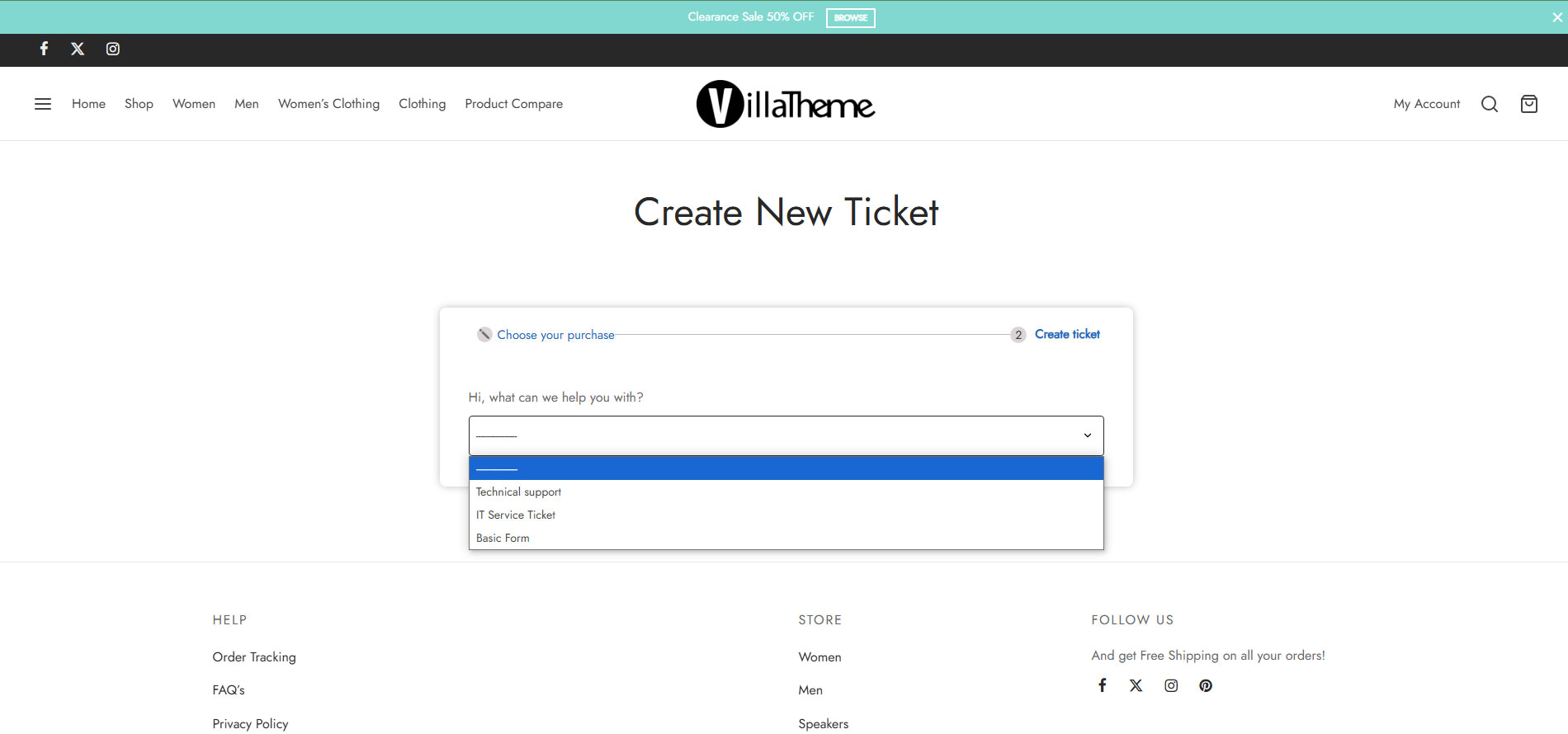
Drag-and-drop form builder (sections, heading, gap, divider, text, textarea, number, select, checkbox, radio, upload, editor, categories, captcha, …)
Multiple forms / problem selection; per-form visibility (guest / logged-in / shortcode)
Terms & GDPR checkboxes; validation and upload messages
Optional Google reCAPTCHA on forms when Captcha is enabled
Roles & authentication
Helpdesk roles (support manager, supporter, customer, blocked, …)
Built-in login / register / lost password (or redirect to custom login)
Google reCAPTCHA v2/v3 on auth forms (server verify, fail-closed without secret)
Auth rate limiting
Email & notifications
Emails for create, reply, close (auto-close only for close email when enabled)
Separate admin/customer templates; HTML editor; BCC/CC; template colors; footer text
Dynamic placeholders (incl. guest token)
Unanswered-ticket alert to admin after N hours
Automation
Auto-close after N hours without customer reply (optional close message; 0 = off)
Configurable cron interval; WP-Cron + traffic fallback; deferred shutdown run
Working hours & holidays
Weekly working hours (quick-fill from Monday)
Unlimited holidays with message
Shortcodes for working hours / holiday message
Knowledge Base & FAQs
KB CPT, categories/tags, archive/single, views count
KB directory layout + live search shortcode
FAQs CPT; accordion layout by category + search
Editable archive slugs and subtitles
Admin & reporting
Admin tickets list: columns, Screen Options, sorting, supporter filter, Select All / Shift+click
Bulk assign / categories / status; “View ticket” frontend URL
Categories & statuses management; form builder admin
Reports: tickets by day/month/year with status & category charts
Dashboard widget: today’s tickets by form/category + completed
System Status page + support request to VillaTheme
Settings with field descriptions; import/export hardening
WooCommerce
My Account Tickets endpoint
Create form: order / order item fields (required when configured)
Order/item shown on ticket content; category rules can use order data
3rd party service
- This plugin relies on Google reCAPTCHA services to ensure ReCAPTCHA function work properly.
► Google reCAPTCHA
► Google reCAPTCHA License
MAY BE YOU NEED
9MAIL – WordPress Email Templates Designer
Abandoned Cart Recovery for WooCommerce
Advanced Product Information for WooCommerce
AFFI – Affiliate Marketing for WooCommerce
ALD – Dropshipping and Fulfillment for AliExpress and WooCommerce
Boost Sales for WooCommerce – Set up Up-Sells & Cross-Sells Popups & Auto Apply Coupon
Bopo – WooCommerce Product Bundle Builder
Bulky – Bulk Edit Products for WooCommerce
Cart All In One For WooCommerce
Catna – Woo Name Your Price and Offers
Checkout Upsell Funnel for WooCommerce
ChinaDS – Tmall-Taobao Dropshipping for WooCommerce
Clear Autoptimize Cache Automatically
COMPE – WooCommerce Compare Products
Coreem – Coupon Reminder for WooCommerce
CURCY – Multi Currency for WooCommerce – Smoothly on WooCommerce 9.x
Customer Coupons for WooCommerce
DEPART – Deposit and Part payment for Woo
Email Template Customizer for WooCommerce
EPOW – Custom Product Options for WooCommerce
EXMAGE – WordPress Image Links
Faview – Virtual Reviews for WooCommerce
FEWC – Extra Checkout Fields For WooCommerce
Free Shipping Bar for WooCommerce
GIFT4U – Gift Cards All in One for Woo
HANDMADE – Dropshipping for Etsy and WooCommerce
LookBook for WooCommerce – Shoppable with Product Tags
Lucky Wheel for WooCommerce – Spin a Sale
Notification for WooCommerce | Boost Your Sales – Recent Sales Popup – Live Feed Sales – Upsells
Orders Tracking for WooCommerce
Pofily – WooCommerce Product Filters
PRENA – Product Pre-Orders for WooCommerce
Product Builder for WooCommerce – Custom PC Builder
Product Size Chart For WooCommerce
Product Variations Swatches for WooCommerce
REDIS – WooCommerce Dynamic Pricing and Discounts
S2W – Import Shopify to WooCommerce
SUBRE – Product Subscription for WooCommerce – Recurring Payments
Suggestion Engine for WooCommerce
Thank You Page Customizer for WooCommerce – Increase Your Sales
TMDS – Dropshipping for TEMU and Woo
VARGAL – Additional Variation Gallery for WooCommerce
VIMA – Multi Customer Addresses for Woo
W2S – Migrate WooCommerce to Shopify
WebPOS – Point of Sale for WooCommerce
WPBulky – WordPress Bulk Edit Post Types
Documentation
Plugin Links
Screenshots


Installation
- Unzip the download package
- Upload
happy-helpdesk-support-ticket-systemto the/wp-content/plugins/directory - Activate the plugin through the ‘Plugins’ menu in WordPress
Reviews
There are no reviews for this plugin.
Contributors & Developers
“HAPPY – Helpdesk Support Ticket System” is open source software. The following people have contributed to this plugin.
Contributors

Translate “HAPPY – Helpdesk Support Ticket System” into your language.
Interested in development?
Browse the code, check out the SVN repository, or subscribe to the development log by RSS.
Changelog
2026.08.17 – version 2.0.1
– Fixed: Auto-close cron no longer posts inactivity reply on tickets already closed/resolved or with date_closed set (fresh status check + _happy_auto_closed guard)
– Fixed: Ticket detail — [#CLOSED#] only when status is the configured close status (int/string-safe); strip leftover marker from subject; close action sets status + date_closed and clears ticket cache
– Fixed: Reply ticket — hide canned response HTML list under the dropdown; tighten Quicktags toolbar button styles
– Fixed: Form builder — Cannot set properties of undefined (setting 'settings') when updating section/element editing state
– Fixed: Create ticket with reCAPTCHA enabled — v3 token on submit + hidden submit flag so tickets save; verify only when captcha widget can render
– Updated: WooCommerce My Account tickets badge loads lightweight wc-account-tickets-badge CSS instead of full frontend.css
– Updated: problem-form CSS/JS load only on create-ticket page or happy_forms / happy_single_form shortcodes (filter happy_should_load_problem_form_assets)
– Fixed: Form builder Add Element — restore column width picker (100%/50%/33%/25%) after choosing a field, including when adding on a new row/section
– Fixed: Form builder — cannot add field (elements.length on undefined section); normalize form sections/elements in admin localize
– Fixed: Create ticket form layout/CSS — body styles target form wrapper, scoped box-sizing, default field padding; no longer soft-404 for Woo order gate
– Fixed: Create New Ticket page soft-404 when WooCommerce “Order required” defaulted on or customer had no orders; Order required now defaults off; clearer notice instead of 404
– Fixed: WooCommerce Order required — administrators, support managers, and supporters can see/create tickets without having orders (filter happy_woo_skip_order_requirement)
– Fixed: PHP 8.1 compatibility — null-safe explode/trim/strtolower; guard get_userdata/get_user_by before property access
– Added: Global Enable email notifications switch (Settings Email); master off stops all plugin emails (enable_email_notifications, filter happy_emails_enabled)
– Added: Unanswered Ticket digest — one email per recipient with the full unanswered list ({unanswered_ticket_list}, {unanswered_ticket_count}); action happy_unanswered_tickets_digest_sent
– Added: Email settings — placeholder guide + clearer section/event descriptions
– Fixed: Email placeholders replace correctly ({ticket_url}, {reply_content}, {guest_token}, {subject}, …); guest/customer emails append guest access token to ticket URL
– Fixed: {ticket_url} no longer depends on Support page being set (uses happy_get_ticket_permalink fallback)
– Fixed: Admin bar “View list tickets” under Site Name — link missing when Support page was front page or had no valid permalink
– Updated: New install List Ticket page default slug is list-tickets (post_name)
– Added: Working Hours per-day “Day off” checkbox (Fill skips Day off days); Our/Your clocks + Official hour GMT use WordPress site timezone; Your time = browser/OS local
– Added: Appearance Widgets List Tickets area (top of tickets column; hidden when empty); registered early so it appears in block Widgets UI
– Updated: Shortcode [happy_working_hours] (replaced [happy_working_hour]); Holiday Start/End use Y-m-d date pickers; auto-delete expired holiday events (default on)
2026.08.05 – version 2.0.0
– Added: Auto-close cron interval setting (default 12 hours)
– Added: Secondary DB indexes; gated frontend assets; performance helpers for lists
– Updated: Defaults auto-close 72h / unanswered 24h; tickets_per_page from settings
– Fixed: Customer email content key migration; holiday shortcode; settings save pollution
– Added: Auto-close tickets after N hours without customer reply (with optional close reply message); 0 = disabled
– Added: Unanswered ticket alert — email admin after N hours without supporter reply; 0 = disabled (Email Unanswered Ticket)
– Added: Ticket list row classes for overdue no-response tickets (happy-ticket-overdue, happy-ticket-unanswered-overdue, happy-ticket-awaiting-customer-overdue)
– Added: Extensibility — lifecycle do_action / apply_filters across tickets, replies, email, cron, access, lists, settings, FAQ/KB (see docs/HOOKS.md)
– Added: WooCommerce create form — require order + order item when Order required; show Order / Order item on ticket content
– Fixed: Style settings (table header/footer + tickets/replies pagination colors, custom CSS) now apply on the frontend
– Fixed: Auto-close tickets — query now targets supporter last-replies, paginates safely, and runs via WP-Cron + traffic fallback (auto_close_cron_interval_hours)
– Fixed: Close Ticket email is only sent on auto-close (controlled by “Send email on auto-close”); manual status changes no longer send email
– Fixed: Frontend tickets-per-page (cookie/request) respected in AJAX list refresh
– Fixed: WooCommerce order/item values submit correctly when selects sit outside the form (form attribute); item dropdown JSON escape; fields stacked one per row
– Added: Reports admin page — tickets created by day/month/year with status and category charts
– Added: WordPress dashboard widget — today’s tickets by form/category and completed count
– Added: System Status admin page (WordPress, server, plugin tables, pages) with support request form emailed to support@villatheme.com
– Added: Ticket title display format settings (padded ID, custom placeholders) in Tickets settings
– Added: Category counters on ticket list filters (Pending + Processing + Urgent)
– Added: Problem counters on ticket list filters (Pending + Processing + Urgent)
– Added: Frontend ticket list — filter by supporter (support managers only) with active-ticket counters
– Added: Admin tickets list — Select All and Shift+click range selection
– Added: Admin tickets list — bulk Assign to supporters (multi-select)
– Added: Bulk actions — Add categories / Remove categories (admin list + frontend supporter list)
– Added: Frontend ticket list — Supporter column and bulk Assign supporters (support managers only)
– Added: Ticket information — assign supporters (support managers only); new tickets start unassigned
– Added: Share ticket — Restricted / Shared with unique share link; view and reply without login; replies attributed to ticket owner
– Added: Admin tickets list — filter by supporter
– Added: Admin tickets list — sortable columns and Screen Options for visible columns
– Added: Admin ticket detail — “View ticket” button opens the frontend ticket URL
– Added: Pretty permalinks for tickets (/{list-page}/{id}-{slug}/) and author profile (/{list-page}/happy_{username}/)
– Added: Theme template overrides via {theme}/happy-helpdesk-system/ (child parent plugin)
– Added: Guest ticket access via secure _guest_token links (email {guest_token}, thank-you page, view/reply without login)
– Added: Knowledge Base directory layout with live search ([happy_list_kb layout="directory"])
– Added: FAQs accordion layout grouped by category with search ([happy_list_faq layout="accordion"])
– Added: Descriptions for all settings fields and sections
– Added: Permalinks settings for Knowledge Base / FAQs base slugs (Settings Permalinks)
– Added: Editable Knowledge Base and FAQs archive subtitles in Page settings
– Updated: Ticket list title shows formatted ID + subject (e.g. #000001 Title); same on ticket detail
– Updated: Default ticket list hides Closed and Resolved tickets until filtered by status
– Updated: Ticket list default sort by status priority (Urgent Pending Processing Resolved Closed), then latest update
– Updated: Hide categories, problems, and supporters with zero active-ticket counters in list filters
– Updated: Removed ID column from ticket list; ID is shown in the Topic title
– Updated: Ticket list pagination — page counter and tickets-per-page on the same row; matched font sizes with reply editor
– Updated: Ticket replies (frontend + admin) — chat-style cards; customer left, supporter right with sky-blue border
– Updated: Frontend ticket reply — reply form always visible (removed show/hide reply toggles)
– Updated: Create ticket — “Back to Tickets” above the form (top-left), outside the form card
– Updated: Clearer Email and Page settings copy / shortcode help
– Updated: Removed [CANNED] label from replies when using a canned response
– Updated: Frontend ticket list (mobile ≤782px) — card layout for managers; status icon on same row as title
– Updated: Frontend ticket list (mobile) — Filter panel opens as left drawer with dark overlay
– Updated: Ticket detail (mobile, supporters) — Ticket information opens as right drawer with dark overlay
– Updated: Frontend bulk Assign / Categories selects (mobile) — multi-select expands and dropdown pushes content down
– Updated: List filter counters cached; admin/detail batch helpers; DataTables removed from frontend bundle
– Updated: Google reCAPTCHA v2/v3 (login/register/lost-password + create form when Captcha enabled); v3 score threshold
– Fixed: Administrator blocked from creating tickets by WooCommerce order check
– Fixed: Empty Problem column when ticket has no/invalid form ID
– Fixed: Bulk status change UI when selecting tickets
– Fixed: Knowledge Base / FAQ archive titles no longer show “Archives:” prefix
– Fixed: Single Knowledge Base — views count and linked categories display
– Fixed: reCAPTCHA verify scope, v2 onload timing, missing site key on create form
– Updated: [happy_working_hours] — Online/Offline outline badges, official hours, live clocks (no solid red fill)
– Added: WooCommerce My Account Tickets menu — red badge for Pending ticket count
– Added: Widget area “List Tickets” above the frontend ticket list (shortcodes supported)
2026.06.26 – version 1.0.12
– Updated: Compatible with WP 7.0
2026.03.07 – version 1.0.11
– Fixed: Fixed some error
2025.12.12 – version 1.0.10
– Fixed: Fixed security
– Updated: Compatible with WP 6.9
2025.11.26 – version 1.0.9
– Fixed: Fixed security
2025.10.15 – version 1.0.8
– Fixed: Fixed security
2025.08.02 – version 1.0.7
– Fixed: Fixed security
2025.07.26 – version 1.0.6
– Updated: Update support class
– Updated: Compatible with WP 6.8.2 and WC 10.0.3
2025.04.18 – version 1.0.5
– Updated: Update support class
– Updated: Compatible with WP 6.8 and WC 9.8
– Fixed: Fixed display FAQs list
2025.02.28 – version 1.0.4
– Updated: Min file
– Updated: Compatible with Wc 9.7 and WP 6.7.2
– Updated: Update support class
2025.01.03 – version 1.0.3
– Dev: Add filter hook ‘helpdesk_user_role_administrator’ , ‘helpdesk_get_users_role_administrator’
– Updated: Compatibility check with WP 6.7.1 and WC 9.5
2024.11.18 – version 1.0.2
– Added: Add more allowed file type
– Updated: Compatibility check with WP 6.7 and WC 9.4
– Updated: Update hook compatible with add ons for Envato
– Fixed: Resolved the issue where not all items in WooCommerce orders were displayed.
2024.08.28 – version 1.0.1
– Fixed: Fixed some error
2024.08.06 – version 1.0.0
~ The first released.